1. Upgrade Work Plan
Start here. This page gives the full operator sequence before you install or upgrade anything.Goal
For a Full upgrade, the end state is:Choose your path
Plan the maintenance window
For the illustrated 3-node DL + 3-node DA example, use the following as planning estimates rather than guaranteed durations:
The example diagram estimates a production maintenance window of roughly 8–9 hours, with Mirror Server preparation completed beforehand. Actual time depends on node count, storage performance, WAN/LAN throughput, reboot time, package state, and cluster recovery time.
Do not compress the maintenance plan by skipping an Ubuntu LTS hop or by starting DA bringup before DL has passed its readiness gate.
Full maintenance sequence
1
Prepare the Mirror Server before downtime
Complete configuration, download/prepare, HTTP distribution, readiness validation, and generate fresh DP client commands. The required gate is Upgrade Readiness = PASS.
2
Pre-check the DPs and pause services
Confirm connectivity and current versions, and pause DP services when the current generated procedure instructs you to. Pre-checks and the service pause must be complete before entering the snapshot/checkpoint gate.
3
Satisfy the powered-off snapshot/checkpoint gate
After DP pre-checks and the service pause, if the current upgrade client instructs you to shut down and create a powered-off snapshot/checkpoint, complete that gate on every required node. Do not start the Ubuntu upgrade until this gate is complete.
4
Upgrade Ubuntu on every required node
After the snapshot/checkpoint gate, follow
16.04 → 18.04 → 20.04 → 22.04 → 24.04 in order. Each hop is a separate controlled transition.5
Stage DP 6.6.0 Phase 2 on every required node
Complete staging/preflight on the DL master, DL workers, DA master, and DA workers before final cluster orchestration.
6
Bring up the DL cluster first
Run final orchestration from the DL master and wait until the DL cluster is healthy.
7
Bring up the DA cluster next
Run final orchestration from the DA master only after the DL gate has passed.
8
Resume and validate the complete system
Confirm DP version, node readiness, pods, host services, NTP, DNS, licensing, Web UI, and normal operations before closing the change.
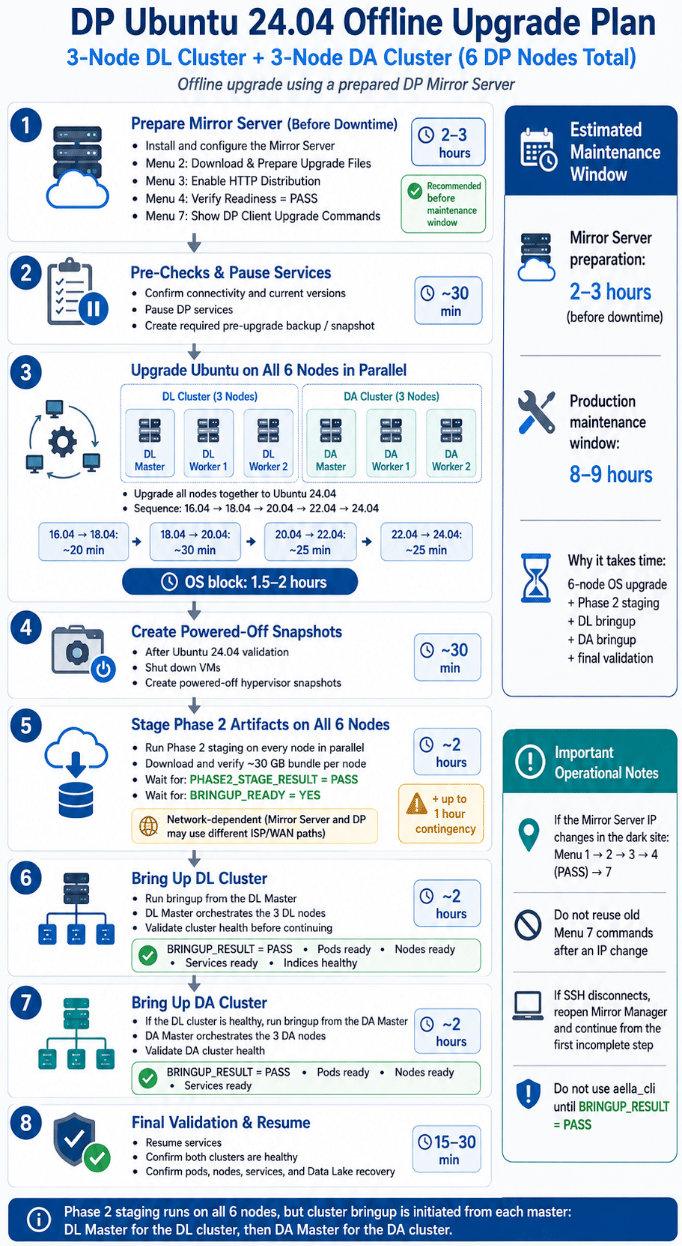
Example work plan for a 3-node DL cluster and 3-node DA cluster
Go / no-go gates
Do not move to the next major stage unless the current stage is complete:Safety rules
- Create the required hypervisor snapshot(s) of every DP VM before destructive DP work.
- The project does not provide a supported OS or DP-runtime rollback command. Snapshot restore is the recovery path for destructive failures that cannot be recovered in place.
- Do not reuse old generated commands after the Mirror Server IP or relevant configuration changes.
- Do not mix historical 6.5.0,
apt-cacher-ng, or full-mirror runbooks with the current 6.6.0 Mirror Manager workflow. - Menu 7 generated by the current installed Mirror Manager is the authoritative source for environment-specific DP commands.
Before you continue
- Correct Full / Phase 2 Only path selected
- Maintenance window approved
- All target nodes and roles identified
- Snapshot/recovery method confirmed
- Mirror Server build or existing-server plan confirmed
- Required network paths and credentials available