DP Offline Ubuntu Upgrade Guide
This site is an operator runbook. If this is your first time performing the upgrade, start with Step 1 and continue in order. You should not need to assemble a procedure from separate technical pages.The complete flow
Follow these five steps
1. Upgrade Work Plan
Confirm the upgrade path, maintenance sequence, snapshots, cluster order, and go/no-go gates before touching any DP.
2. Ubuntu 24.04 Server Installation
Build the Mirror Server when a new server is required, then verify disk, network, and SSH access.
3. Mirror Server Setup
Install Mirror Manager, prepare the files, enable HTTP distribution, and reach Upgrade Readiness = PASS.
4. DP Offline Ubuntu Upgrade
Use fresh Menu 7 commands for every OS hop and for DP 6.6.0 Phase 2 bringup.
5. Post-Upgrade Validation
Verify Ubuntu, DP version, DL/DA readiness, services, NTP/DNS, application health, and recovery-snapshot cleanup criteria.
Overall work plan
The following example shows the complete flow for a 3-node DL cluster + 3-node DA cluster. Smaller deployments follow the same stage order; use the current Menu 7 output for the exact commands and node-specific procedure.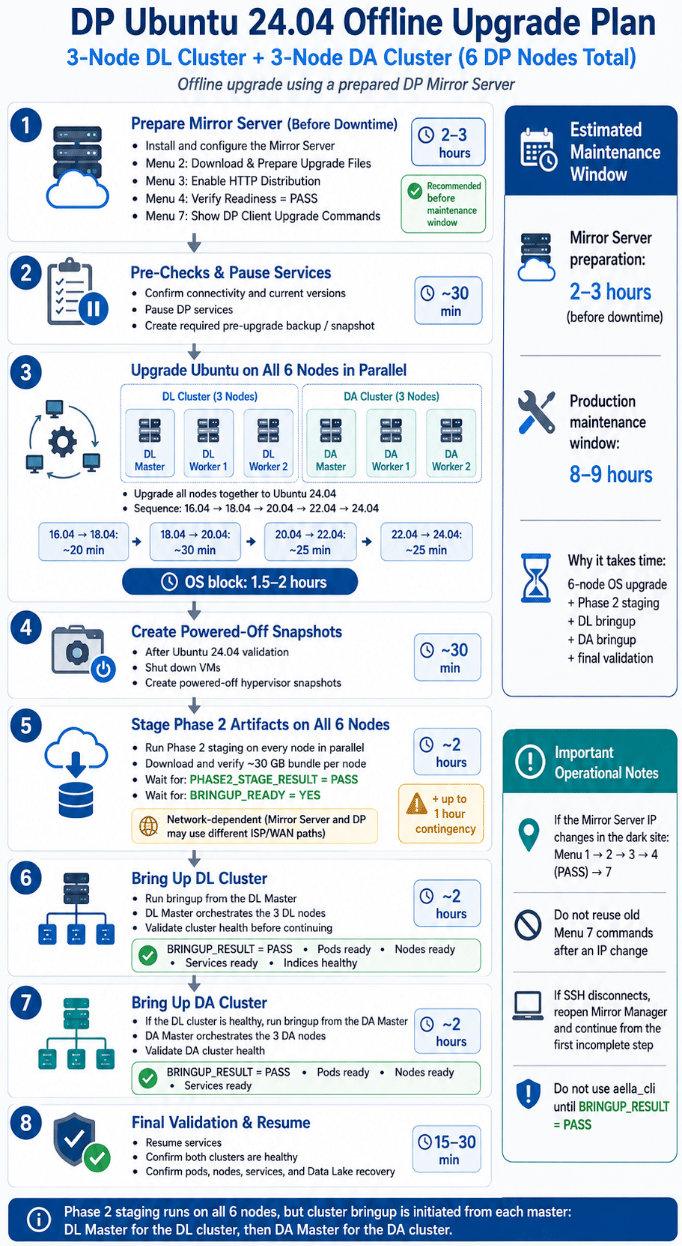
Example end-to-end maintenance flow for a 6-node DP deployment
Which path applies to my DP?
The current Mirror Manager target is DP 6.6.0. Historical screenshots or recordings may show 6.5.0; do not copy those release-specific commands into the active workflow.
Three rules to remember
- Prepare first. Complete the Mirror Server work before the production maintenance window whenever possible.
- Use fresh generated commands. Menu 7 is the authoritative command source for the current Mirror Server IP, mode, and cluster configuration.
- Keep recovery available. Create the required hypervisor snapshot(s), follow any additional powered-off snapshot gate printed by the current upgrade client, and keep recovery points until final validation and change-control closure.