> ## Documentation Index
> Fetch the complete documentation index at: https://dpos.xdr.ooo/llms.txt
> Use this file to discover all available pages before exploring further.
# DP Offline Ubuntu Upgrade Guide
> Follow one ordered runbook to prepare the Mirror Server, upgrade DP nodes to Ubuntu 24.04, complete DP 6.6.0 bringup, and validate the system.
# DP Offline Ubuntu Upgrade Guide
This site is an **operator runbook**. If this is your first time performing the upgrade, start with **Step 1** and continue in order. You should not need to assemble a procedure from separate technical pages.
**First time here?** Start with **[1. Upgrade Work Plan](/runbook/work-plan)**, then follow the numbered pages in the left navigation from top to bottom.
## The complete flow
```text theme={null}
Plan the work
→ Build / verify Ubuntu 24.04 Mirror Server
→ Prepare upgrade files and reach READINESS = PASS
→ DP Ubuntu 16.04 → 18.04 → 20.04 → 22.04 → 24.04
→ DP 6.6.0 Phase 2 bringup
→ Final validation and approved snapshot cleanup
```
The Mirror Server downloads and validates the required files in advance. During the production upgrade, DP hosts retrieve prepared material from that server over **HTTP/TCP 80**.
## Follow these five steps
Confirm the upgrade path, maintenance sequence, snapshots, cluster order, and go/no-go gates before touching any DP.
Build the Mirror Server when a new server is required, then verify disk, network, and SSH access.
Install Mirror Manager, prepare the files, enable HTTP distribution, and reach **Upgrade Readiness = PASS**.
Use fresh Menu 7 commands for every OS hop and for DP 6.6.0 Phase 2 bringup.
Verify Ubuntu, DP version, DL/DA readiness, services, NTP/DNS, application health, and recovery-snapshot cleanup criteria.
Do not begin DP-side work until the current Mirror Server configuration reports **Upgrade Readiness = PASS** and fresh Menu 7 commands have been generated.
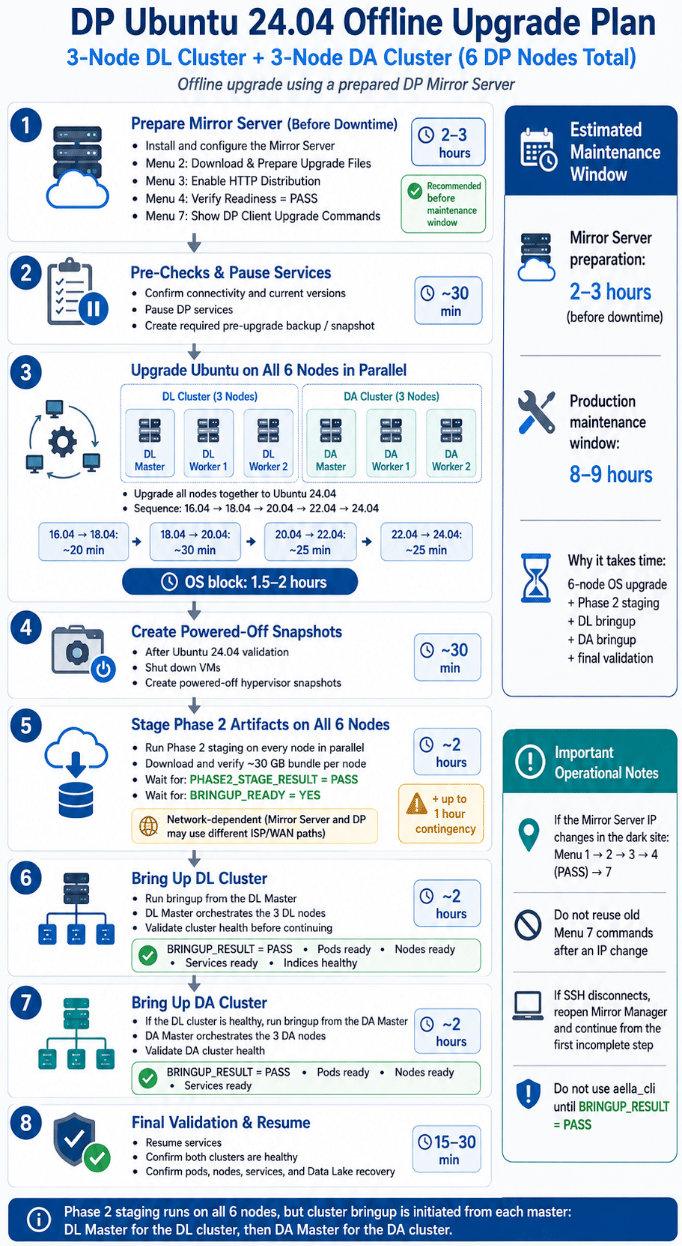
## Overall work plan
The following example shows the complete flow for a **3-node DL cluster + 3-node DA cluster**. Smaller deployments follow the same stage order; use the current Menu 7 output for the exact commands and node-specific procedure.
 ## Which path applies to my DP?
| Current state | Use | Result |
| -------------------------------------------- | ----------------------------- | ----------------------- |
| Supported DP 6.2.x–6.5.0 on Ubuntu 16.04 | **Full OS Upgrade + Phase 2** | Ubuntu 24.04 + DP 6.6.0 |
| Supported DP 6.2–6.5 already on Ubuntu 24.04 | **Phase 2 Only** | DP 6.6.0 |
| Healthy DP 6.6.0 on Ubuntu 24.04 | Normally no upgrade | No change |
The current Mirror Manager target is **DP 6.6.0**. Historical screenshots or recordings may show 6.5.0; do not copy those release-specific commands into the active workflow.
## Three rules to remember
1. **Prepare first.** Complete the Mirror Server work before the production maintenance window whenever possible.
2. **Use fresh generated commands.** Menu 7 is the authoritative command source for the current Mirror Server IP, mode, and cluster configuration.
3. **Keep recovery available.** Create the required hypervisor snapshot(s), follow any additional powered-off snapshot gate printed by the current upgrade client, and keep recovery points until final validation and change-control closure.
## If something does not match the guide
Use **[Troubleshooting](/operations/troubleshooting)** for the failed layer, **[Retry & Recovery](/operations/retry-recovery)** for interrupted operations or Phase 1 state, and **[Video Guides](/video-guides)** for supplemental visual references. Lower-level implementation material is separated into the **Reference** tab so the numbered runbook remains the primary operator path.
## Which path applies to my DP?
| Current state | Use | Result |
| -------------------------------------------- | ----------------------------- | ----------------------- |
| Supported DP 6.2.x–6.5.0 on Ubuntu 16.04 | **Full OS Upgrade + Phase 2** | Ubuntu 24.04 + DP 6.6.0 |
| Supported DP 6.2–6.5 already on Ubuntu 24.04 | **Phase 2 Only** | DP 6.6.0 |
| Healthy DP 6.6.0 on Ubuntu 24.04 | Normally no upgrade | No change |
The current Mirror Manager target is **DP 6.6.0**. Historical screenshots or recordings may show 6.5.0; do not copy those release-specific commands into the active workflow.
## Three rules to remember
1. **Prepare first.** Complete the Mirror Server work before the production maintenance window whenever possible.
2. **Use fresh generated commands.** Menu 7 is the authoritative command source for the current Mirror Server IP, mode, and cluster configuration.
3. **Keep recovery available.** Create the required hypervisor snapshot(s), follow any additional powered-off snapshot gate printed by the current upgrade client, and keep recovery points until final validation and change-control closure.
## If something does not match the guide
Use **[Troubleshooting](/operations/troubleshooting)** for the failed layer, **[Retry & Recovery](/operations/retry-recovery)** for interrupted operations or Phase 1 state, and **[Video Guides](/video-guides)** for supplemental visual references. Lower-level implementation material is separated into the **Reference** tab so the numbered runbook remains the primary operator path.